
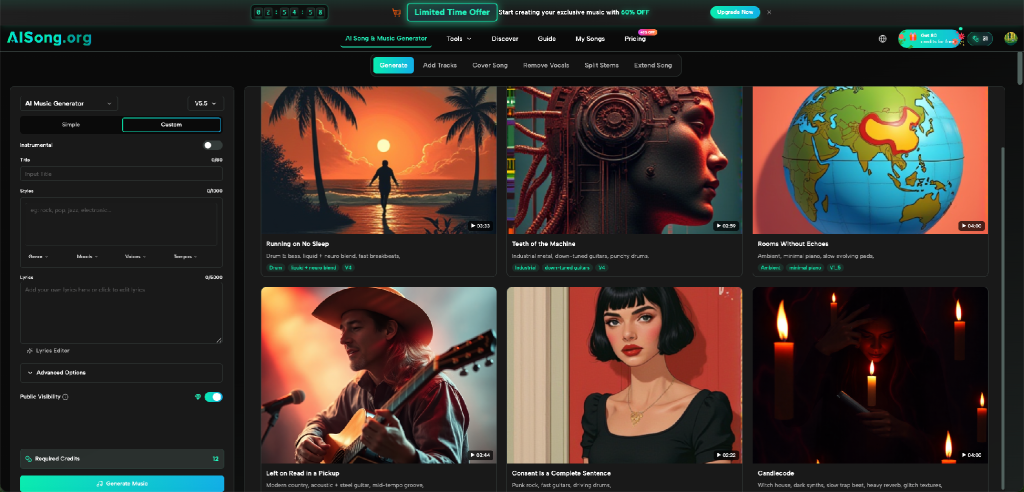
A developer finishes a playable prototype, records a short demo, and immediately notices something missing. The controls work. The interface is clear. The main feature behaves correctly. Yet the recording feels flat because the only sound is mouse clicks and system noise. Hiring a composer for every early build is unrealistic, while a random track can misrepresent it. AI Song can help at this stage by turning a written music direction into a track that lets a team test how sound changes the experience.
Prototype Music Is a Design Tool, Not Final Decoration
Developers often postpone music until the product is nearly finished. Temporary music can answer useful questions much earlier.
Does the menu feel calm or tense? Does the tutorial move too slowly? Does a feature reveal feel important enough? Does the game loop become tiring after several minutes? A rough soundtrack can expose pacing problems that are difficult to notice in silence.
The goal is to make the prototype easier to evaluate, not to pretend the audio work is finished. A team can hear whether a dramatic track overwhelms a simple utility or narration.
Think of the track as purposeful placeholder art.
Start With the Product State You Need to Test
Do not begin with “make game music.” Start with one product state and one clear target.
Imagine a puzzle game set in a quiet workshop. Compare one warm, slow direction with another built around a subtle ticking rhythm.
An investor demo may need clean instrumental music beneath spoken explanation. The product state is “guided feature walkthrough,” not “technology video.”
Build a Prompt Like a Technical Specification
A good music prompt resembles a small specification: required behavior, constraints, and exclusions.
1. Define the function
State what the music is supporting. Examples include a title screen, a two-minute product walkthrough, a level-selection menu, or a successful task completion.
“Instrumental music for a calm settings menu” is more useful than “ambient electronic music.”
2. Describe the emotional range
Choose one main feeling and one secondary quality. A debugging tutorial might feel focused and steady. A science-fiction game menu might feel mysterious but not threatening. A celebratory feature reveal might feel positive without becoming cinematic.
The secondary quality sets a boundary. “Tense but controlled” differs from “tense and chaotic.”
3. Explain pacing in plain language
Describe how quickly the track should move and whether the energy should remain stable. A background track for narration often needs a steady level. A game trailer may need a gradual rise. A loading screen may need a loop-friendly feeling, although you should not assume a generator produces a technically seamless loop unless it specifically says so.
Use instructions such as “slow pulse,” “mid-tempo with consistent energy,” or “build gently after the opening.” These are easier to evaluate than a long list of production terms.
4. Add exclusions
Exclusions can be as useful as positive instructions. State “no vocals” when speech must remain clear. Avoid a heavy drop if the interface is minimal. Avoid busy percussion when the video includes detailed technical explanation.
These limits reduce the chance that a musically impressive result becomes unusable in the actual demo.
Generate a Controlled Set of Test Tracks
This AI Music Generator can create music from a text description, while AISong’s current interface also exposes style guidance, genre, mood, voice, tempo, lyrics, and an instrumental option. For a software prototype, the most relevant controls are often style, mood, tempo, and instrumental output.
Keep the function and pacing constant, then vary the emotional direction.
A useful test matrix might look like this:
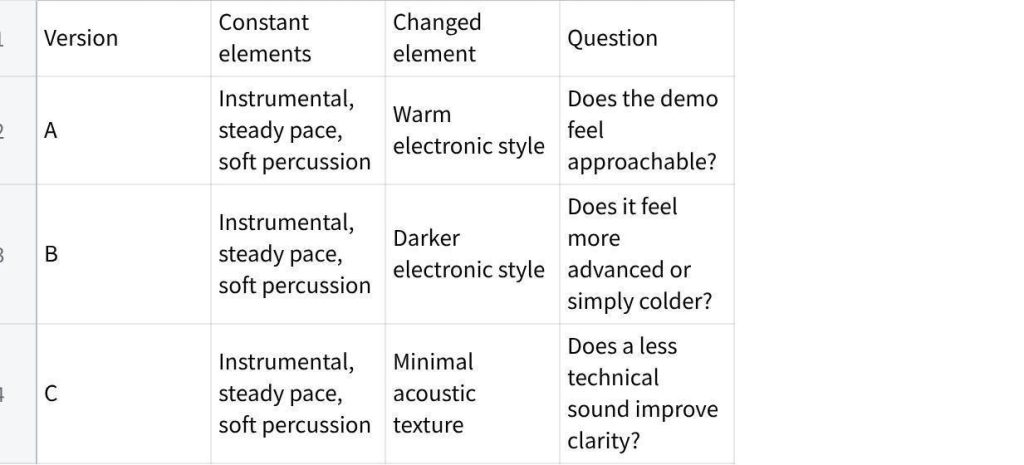
点击图片可查看完整电子表格
Name each file with the version and purpose. “menu_warm_A” is more useful than “track_final_new2.”
Test Sound Inside the Build or Recording
Run the comparison with the screen and interaction unchanged. If the visuals, narration, and music all change together, nobody can tell what caused the better reaction. A controlled test may feel less exciting, but it produces a clearer decision.
Listening alone does not show whether a track supports the product.
For a recorded walkthrough, place the music under the narration at a low level. Watch for moments when melodic movement pulls attention away from a key instruction. If you stop understanding the speaker, the track is too busy, too loud, or both.
For an interactive prototype, test the same section several times. Repetition changes perception. A track that feels exciting once may become tiring during a menu the player visits repeatedly. Ask testers whether they noticed the music only when it helped, or whether it became the main event.
Test laptop and phone speakers too. A public demo must survive common playback conditions.
Separate Prototype Decisions From Production Claims
Generated music can help a team choose direction, but it should not create false certainty. A successful temporary track does not automatically solve implementation, adaptive music, mixing, transitions, or accessibility.
Keep a short decision note beside each approved prototype track:
- What product state did it support?
- Which mood and pace worked?
- What distracted users?
- Which elements should a final composer or audio designer retain?
- Where will narration, sound effects, or alerts need space?
This explains the preference better than “Make something like the old demo.”
Avoid building features around assumptions the test has not proved. A downloaded track can support a video or simple playback test. It does not confirm that the same audio will loop perfectly, react to game events, or meet every platform requirement.
Three Practical Prototype Scenarios
1. A Unity game vertical slice
Create an instrumental direction for one room or level. Test whether the pace supports exploration. Record feedback after ten minutes, not only after the first impression.
2. A SaaS feature walkthrough
Use steady, restrained music under a narrated screen recording. The track should prevent silence from feeling empty without competing with terms, numbers, or instructions.
3. A student coding project
Generate a simple title or credits track that matches the project theme. This gives the presentation a finished shape while keeping the student focused on code, documentation, and testing.
Common Errors in Technical Audio Prototyping
The first error is choosing music before defining the product state. The second is testing only through headphones. The third is treating “more dramatic” as “more professional.” The fourth is keeping no record of the prompt or decision.
Another common error is attaching the team to one temporary track. Prototype music should help identify qualities, not become untouchable. If the team says, “We need this exact song,” ask what they actually value: the tempo, the restrained opening, the synth texture, or the absence of vocals.
That answer is the reusable design information.
Conclusion
Early music testing can make a software demo easier to judge, but only when the track has a defined job. Choose one product state, write a prompt like a small specification, generate controlled alternatives, and test them inside the real build or recording. Then document what the team learned instead of treating a temporary track as finished production. Try the method on one upcoming demo and use the result to start a clearer audio conversation.