
A small game idea can need many visuals before anyone writes the final code. You may need a character look, a room, a prop, or a few images that explain the mood to a teammate. Starting each one from zero can make the style drift quickly. Tools such as Nano Banana are useful here because Kimg AI supports both prompt-based image creation and editing from existing images. The practical advantage is simple: begin with a reference and ask for controlled changes instead of repeatedly describing the same visual identity.
Decide What the Reference Image Is Supposed to Control
A reference image is most helpful when you know what you want it to preserve. Do not upload an image and expect the model to guess whether the important part is the character, color palette, clothing, camera angle, or environment.
Suppose you are designing a cozy mystery game. You already have a portrait of the main detective wearing a tan coat. If the coat and face are important, say so. Then ask for a different location, such as a train platform, bookstore, or apartment hallway.
The same rule works for environments. If a bedroom concept already has the right layout, ask for a new time of day while keeping the furniture placement. That makes the reference a constraint, not just inspiration.
Kimg AI currently describes Nano Banana as supporting existing-photo transformations while preserving key structural elements, which fits this kind of controlled iteration.
Build the Concept in Three Controlled Passes
Trying to solve character design, environment, lighting, props, and camera composition in one request can create inconsistent results. A three-pass approach is easier to inspect and revise.
1. Lock the Main Subject
Start with the element players will recognize most easily. For a character, that might be the face, hairstyle, coat, backpack, or silhouette. For an object, it could be the shape and material of a key prop.
Keep the first prompt narrow. Ask for a clean pose or simple scene that makes the subject easy to evaluate. Do not add dramatic weather or complex action yet. You are checking whether the core design is stable enough to use in later images.
2. Add the Environment
Once the main subject works, move it into a location that supports the game. A delivery rider could appear outside an apartment building. A shopkeeper could stand behind a cluttered counter. A student character could sit in a late-night library.
Describe the setting in practical terms: room size, major furniture, time of day, and camera distance. Avoid overloading the prompt with tiny background objects. The environment should explain where the player is without competing with the subject.
3. Create a Story Moment
The third pass should show something happening. The character may notice a broken lock, examine a map, wait for an elevator, or hold an object discovered earlier in the game.
This is where concept art becomes more useful to a designer or teammate. Instead of presenting a character in isolation, the image starts to communicate gameplay mood, story context, or level ideas. Keep the action readable so the purpose of the scene is obvious at a glance.
Use Multiple References When One Image Cannot Explain the Idea
Some concepts have two or three visual requirements that are difficult to describe with text alone. You may like the character from one image, the jacket from another, and the room mood from a third.
Kimg AI says Nano Banana supports up to four reference images, giving users a way to guide character consistency and style matching across generations. That does not mean you should upload four images every time. More references can also create competing instructions.
Use the fewest references that clearly solve the problem. If two images are enough, stop at two. Then tell the model what each reference contributes. For example: “Use Image 1 for the character’s face and hair. Use Image 2 for the coat shape. Create a new subway platform background.”
That is clearer than asking the model to “combine these images” without priorities.
Keep a Simple Visual Spec Beside Your Prompts
When you generate several game concepts over different sessions, prompt wording can drift. A short visual spec helps you return to the same decisions.
You do not need a design document. A small table is enough:
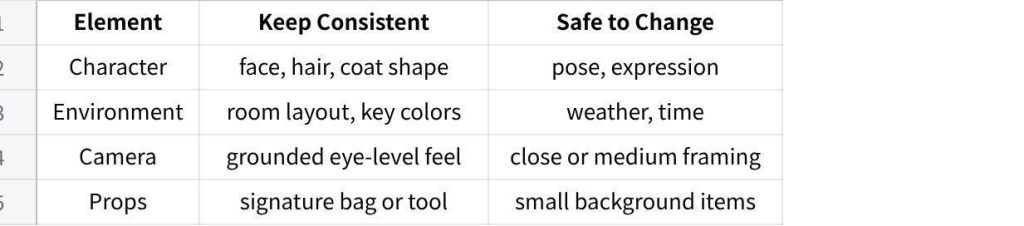
点击图片可查看完整电子表格
Before making a new image, check the table and mention only the relevant constraints in your prompt. If you are creating a close-up dialogue portrait, room layout probably does not matter. If you are testing a new level location, the character’s exact expression may not matter.
This prevents prompts from becoming long lists of instructions that fight each other.
Review Concept Art for Function, Not Just Visual Quality
A beautiful image can still be weak game concept art. Before keeping a result, ask what someone else can learn from it.
If the image is meant to define a character, can you clearly see the important clothing and silhouette? If it is a level concept, is the space understandable? If it is a story beat, is the action readable without a paragraph of explanation?
When using Nano Banana AI, compare variations based on the design question you are trying to answer. One image may have better lighting, while another communicates the room layout more clearly. For production discussion, the second image may be more useful.
Also inspect details that could accidentally become “canon.” A model may invent a badge, pocket, sign, or piece of equipment. If you keep using that image as a reference, the accidental detail can spread into later concepts.
AI can help you explore options, but it does not decide what belongs in the game. A convincing room may still have a poor navigation path, and a memorable outfit may clash with the story period. Keep asking what decision the image is supposed to support.
Turn Good Stills Into Simple Motion Tests
Kimg AI also presents image-to-video capabilities alongside its image tools, including animation through Veo 3. For a game creator, that can be useful as a mood test rather than a finished cutscene.
Take a still environment and add slow rain, moving curtains, flickering signs, or a gentle camera push. For a character, try a subtle glance or small shift in posture. These tests can help you judge whether a scene still feels right once movement enters it.
Keep the motion limited. If you ask the model to move the character, camera, weather, props, and background figures all at once, it becomes harder to tell which part supports the game idea. One controlled motion can answer more than a busy cinematic sequence.
Conclusion
AI concept art is most useful when it helps you make a specific design decision. Start by deciding what the reference must preserve, build the image in controlled passes, and use additional references only when they solve a clear problem. Keep a short visual spec so later generations do not drift, and judge each result by what it communicates to the game project rather than how dramatic it looks. Pick one character, room, or prop from your current idea and use it to answer one design question before generating anything else.